SERGEN Load Playlist

Android · Android TV · Web

Gökbörü Stream is now Sergen (formerly known as Gökbörü Stream)

Your playlist.
On every screen.

Connect your M3U playlist or Xtream account and get a channel menu with logos and numbers, remote color keys and a program guide out of the box. Same setup, same playlist on phone and TV.

Sergen sells no channels: you bring the source. Your data stays on your device only.

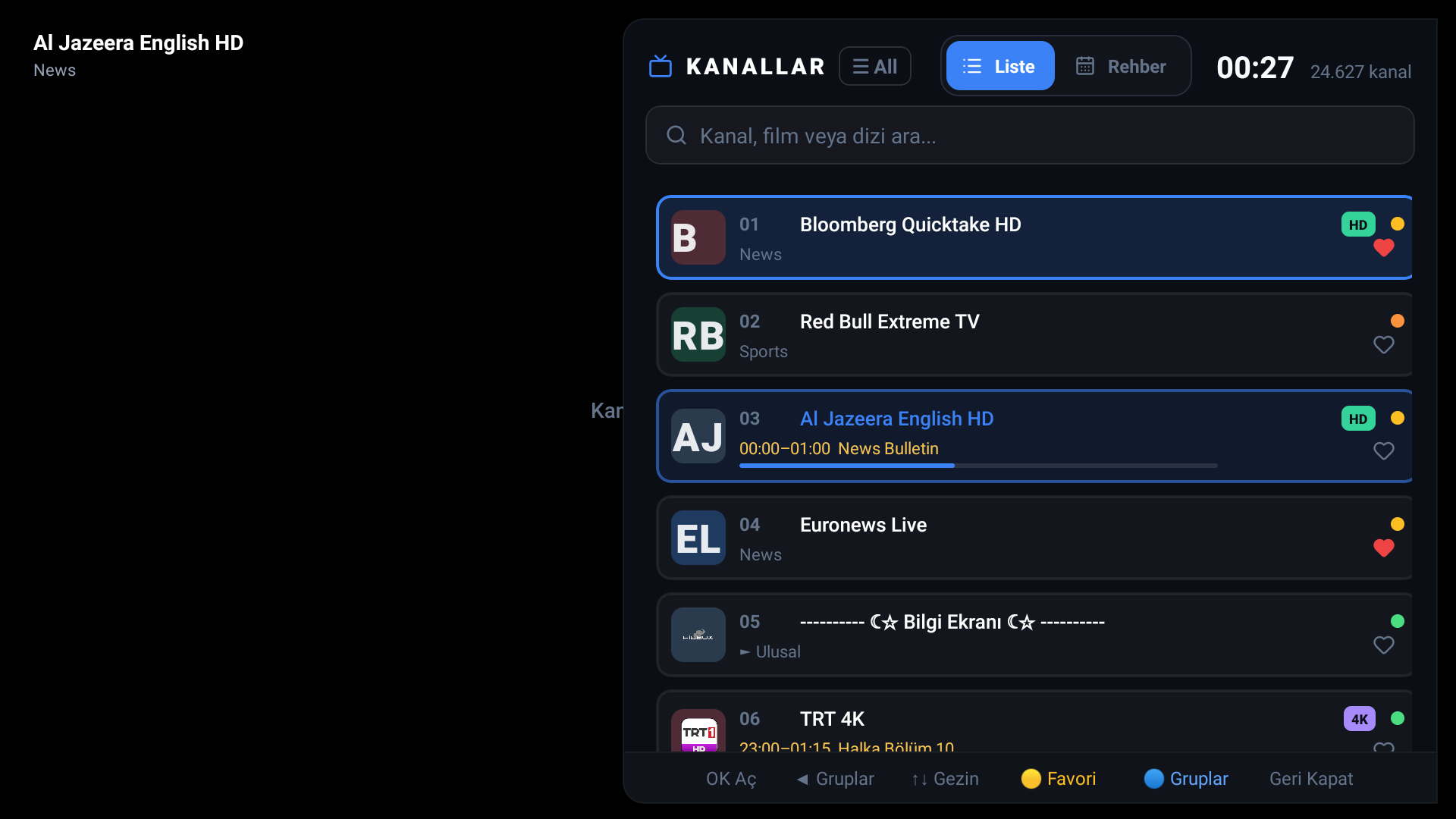
Sergen TV app: live clock and channel counter, numbered channel cards, EPG progress bars, HD/4K badges and the color-key guide
Real screen from the app: live clock, 24,000+ channels, EPG progress and the remote key guide.
Sergen channel list, search and bottom tabs
Channel list, search and bottom tabs (Live · Movies · Series · Favorites · Settings)

Try it without leaving the site

This player is exactly the web player from the app: click and the stream starts. Once you connect your own list, the same experience continues on your phone, tablet and TV.

Open the full app — including lists, favorites and the guide — as a live demo.

What's inside

Set up in 60 seconds with Xtream Codes

Server, username, password. The app pulls the live and movie catalogs in one go, groups them and stores genre info. Your password never leaves your device; on TV, the portal server connects on your behalf.

Live TV + VOD catalog
Automatic category grouping
Account expiry date visible
M3U URL and file support
Sergen setup wizard, Xtream Codes entry

A TV menu designed for the remote

Numbered channel cards with logos, quality badges read automatically from channel names, and real functions assigned to the remote's color keys. OK opens the channel; the color keys open settings, the guide, favorites and categories.

🔴 Settings 🟢 Guide 🟡 Favorite 🔵 Categories
Sergen TV channel menu: numbered channel cards, EPG and the color-key guide

Program guide in TiviMate layout

A timeline anchored to now: channels as rows, programs along the hour axis. The program on air is highlighted, finished ones fade, and a red line marks the current moment. Move back and forth within a row with the remote.

XMLTV guide, url-tvg auto-detected
On-air progress bar on the cards
Now line and live highlight
A-Z quick scroll and search

Set up on TV: type a code or scan a QR

Get the pairing code in the app and enter it in this site's portal. You load the playlist from your phone and the TV starts pulling it. The code also appears on screen as a QR — scan it with your phone and there is nothing to type. No MAC address hassle: a 6-character code, valid for 30 minutes.

Load via Xtream / M3U URL / pasted text
EPG URL can also be set in the portal
Credentials are never sent to the device

How it compares

Judged by our own criteria; figures taken from the providers' published prices. Sergen, formerly known as Gökbörü Stream — in the blue column.

SergenSiPTVTiviMateSmarters Pro
Free trial14 days7 days24 hourslimited
Price (per device)€4,99 one-time€5,49 one-timeyearly subscriptionfree (with ads)
Phone + TV, one account✓ via QR✗ TV-focused✗ TV only
Turkish interface✓ main languagepartial
Multilingual interface✓ TR/EN/AR/NL
Remote color keys
Portal loading via MAC / code✓ both✓ MAC

→ Swipe the table sideways to compare

TiviMate's phone app is only a remote companion; it plays no channels. SiPTV accepts playlists via MAC only.

Setup in three steps

  1. Install the appWorks on Android phones, tablets and Android TV. Contact us for the APK installer; the store version is in preparation.
  2. Get the pairing codeIn the app: Settings → TV / Device Pairing → Get Pairing Code. A 6-digit code and a QR appear on screen.
  3. Load your list in the portalEnter the code on the /mylist page; save your Xtream login, M3U URL or file contents. The app pulls the list by itself. You can also connect with the MAC address shown on screen instead of the code.

Pricing

14-DAY FREE TRIAL FREE DURING BETA
€4,99 / device, one-time (planned)

The app is free. Pairing a device to the portal is free during beta; after beta, a one-time per-device activation will apply. Registered beta devices are included in the first year free of charge.

The activation payment is €4,99 and is made through the Activation card on this site via Mollie (iDEAL, Bancontact, card) after you pair your device. Pairing is free during beta.

FAQ

Do you sell channel lists or subscriptions?
No. Sergen (formerly known as Gökbörü Stream) is a player; you connect your own M3U source or Xtream account. We do not help find channels.
Where is my data stored?
Playlists, favorites and account details stay on the device where the app is installed. The portal only keeps your device ID and source configuration; these are never shared with third parties.
Is EPG required?
No. You can watch without a guide. If you provide an XMLTV URL the timeline opens; if your M3U contains url-tvg the URL is picked up automatically.
I use SiPTV or TiviMate; can I switch?
Yes. The same M3U URL or Xtream account works in Sergen too. For SiPTV habits there is also MAC-address portal linking. Compare for free during the 14-day trial.
Does TiviMate work on phones too?
TiviMate is Android TV only; its phone app is a remote companion that plays no channels. Sergen shares the same list and favorites between phone and TV.
What do the color keys on the remote do?
In the TV channel menu: red opens Settings, green the Guide, yellow adds a favorite and blue opens category selection. Familiar for SiPTV users.
Is my Xtream password written onto the TV?
No. On the TV side the list is produced by the portal server; the password stays in the portal only. When you delete the portal record, access is cut too.

Release notes

Multilingual interface and A-Z quick scroll

The interface is now Turkish, English, Arabic and Dutch: the language changes with the remote on TV and at the top of Settings on phones. Added: an A-Z strip you drag from the right edge of the phone list, long-press add-to-favorites in Recently Watched, and a full translation of the Settings screen.

SiPTV-style TV menu and color keys

The TV channel menu is renewed: cards with logos and numbers, functions assigned to the remote's color keys (Settings, Guide, Favorite, Categories), quality badges read from channel names, and portal pairing via MAC address. The portal's 14-day free trial has started.

QR pairing and transfer between devices

The pairing code on TV now also appears as a QR: scan it with your phone and the portal links automatically. The "Send List to Phone / TV" card in Settings transfers your current list to another device with a single scan. The phone interface moved to a native bottom tab bar; large lists no longer disappear on restart.

Website and guide improvements

Distinctive error messages when a list fails to load (provider down, wrong URL, server error), a resume mini-player bar on phones, and site security headers.

First public release

Setup wizard (Xtream first), EPG timeline, a fullscreen player and channel rail for phones, a two-column grid for tablets, TV remote support, and the code-based device pairing portal.